Sunday, June 19, 2011





Saturday, June 18, 2011
Britney Spears In Bikini Costumes For Femme Fatale Tour (PHOTOS)

popsugar.com:
Britney Spears took the stage in Sacramento, CA, last night to kick off her Femme Fatale tour! First though, Britney got a hug and kiss from her boyfriend, Jason Trawick, in her dressing room.
OS X Lion Full-Screen App Mode Doesn’t Play Well With External Displays
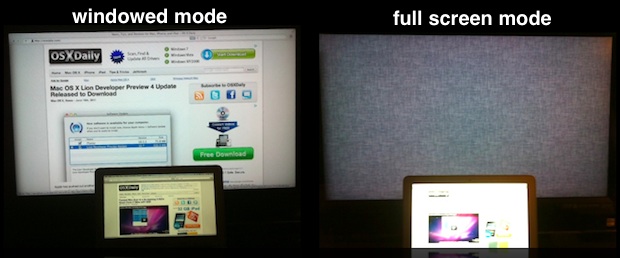
If you use multiple monitors on a regular basis, you might care about how Mac OS X Lion handles Full-Screen Apps when hooked to an external display. In short, it doesn’t work that well.
To be clear, multiple monitors work fine in Lion, everything is the same as past versions of Mac OS X, you can mirror or extend your display as usual, that’s all dandy. The problem arrises when you put an app into Full-Screen mode; this causes only the default display to go into full-screen view, and the external screen becomes just a large and unusable linen wallpaper filled placeholder.
Full-Screen Apps Built with MacBooks in Mind?
Looking at Apple’s web page for the Full Screen App feature, you’ll notice there are no desktop Macs shown, it’s all about the MacBook Air, so it’s entirely possible this feature was developed mostly with laptop users in mind because it benefits them the most.
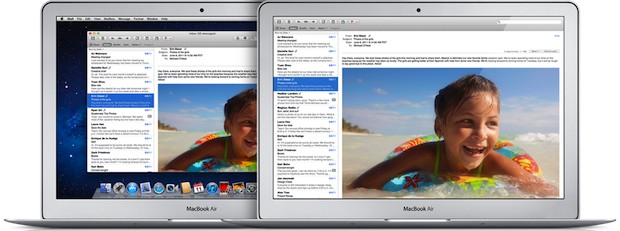
Considering the use-case scenarios, you probably have plenty of screen real estate available if you use an iMac 27″ or if your MacBook Air is hooked up to a large 24″ external LCD. The pixel-saving feature of Full Screen apps is just less useful on a large display than on a smaller screen. Maybe Full-Screen apps were intended for smaller screens to begin with? The feature shines on the MacBook Air 11.6″ and other portable Macs, how useful is full-screen Safari at 2560 x 1440 anyway? As a commenter on MacRumors Forums says, “full screen apps address an issue specific to small screen devices and for larger screens that issue doesn’t need addressing”.
It’s Called “Developer Preview” for a Reason
Finally, remember that Lion is still a “Developer Preview”, meaning things we see now may not be finished and may ship differently in the final release next month. The way that Lion is currently handling full screen apps and external displays (as of DP4 build 11a494a) could be indicative of an unfinished feature. Maybe it’s even a bug? Maybe it will change come time to ship?
Or maybe not? If this is how Lion works with full-screen apps, it’s not that big of a deal, you can always just avoid the feature when your Mac is hooked up to an external display.
For More News Visit: http://osxdaily.com/tag/mac-os-x-10-7/
How to Save 15% to 20% When Buying Mac OS X Lion
OK so Mac OS X Lion won’t be released until next month, but if you do a little preparation now you should be able to save at least 15% off the already low $29.99 price. How? Simple, buying iTunes Gift Cards on sale and redeeming them on the Mac App Store.
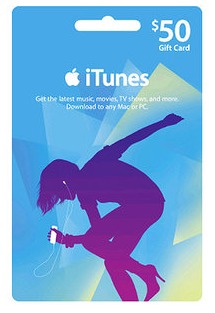
 Here’s the deal with eligible gift cards, they’re labeled a million different things, ranging from iTunes Store gift cards, to App Store gift cards, to iBooks gift cards, but they’ll all redeem on the App Store, just make sure they have that Apple logo.
Here’s a few sale examples:
RiteAid is currently offering $25 iTunes Gift Cards for $20
Best Buy was recently selling all iTunes cards at 15% discounts both in store and online
Target frequently has iTunes, iBooks, and App Store gift cards on sale for 20% off
Walmart has sold $50 iTunes gift cards for as little as $35
This is one of the unseen advantages to Lion, or anything else for that matter, being distributed exclusively through the Mac App Store, easy discounts!
You’ll probably need to shop around a bit and check your local newspaper (you know, those stacks of thinly sliced trees) or even your good old fashioned snailmail junkmail, thats where I found the RiteAid offer that I took advantage of. I heard that Target is discounting packs of them right now, but this probably varies by store and their website doesn’t indicate any such sale.
So grab a couple iTunes gift cards on sale, add the balance to your Apple ID now, and wait for Lion to come out. If you’re not thrilled with the App Store distribution model, don’t forget you can burn a Lion installation DVD yourself too.
For More News Visit: http://osxdaily.com/tag/mac-os-x-10-7/
 Here’s the deal with eligible gift cards, they’re labeled a million different things, ranging from iTunes Store gift cards, to App Store gift cards, to iBooks gift cards, but they’ll all redeem on the App Store, just make sure they have that Apple logo.
Here’s a few sale examples:
RiteAid is currently offering $25 iTunes Gift Cards for $20
Best Buy was recently selling all iTunes cards at 15% discounts both in store and online
Target frequently has iTunes, iBooks, and App Store gift cards on sale for 20% off
Walmart has sold $50 iTunes gift cards for as little as $35
This is one of the unseen advantages to Lion, or anything else for that matter, being distributed exclusively through the Mac App Store, easy discounts!
You’ll probably need to shop around a bit and check your local newspaper (you know, those stacks of thinly sliced trees) or even your good old fashioned snailmail junkmail, thats where I found the RiteAid offer that I took advantage of. I heard that Target is discounting packs of them right now, but this probably varies by store and their website doesn’t indicate any such sale.
So grab a couple iTunes gift cards on sale, add the balance to your Apple ID now, and wait for Lion to come out. If you’re not thrilled with the App Store distribution model, don’t forget you can burn a Lion installation DVD yourself too.
For More News Visit: http://osxdaily.com/tag/mac-os-x-10-7/
Saturday, June 11, 2011
HP to join crowded tablet market with its own TouchPad
I guess it's better to be late than never knock on the door. HP announced Thursday that it will be coming out with its own TouchPad tablet July 1, just in time for fireworks.
We knew a tablet was in the works from the world's largest computer maker best known for its printers and computers.
Cellular South, however, is ready to go with its first Windows Phone 7. The HTC 7 Pro, decked out in dark gray, silver and black, arrives Monday.

The HP TouchPad, with its unique webOS operating system, is all about synergy, as it can gather information from several sites and put in it one place. / Special to The Clarion-Ledger
It is joining a batch of other tablets, including the iPad2, Motorola Xoom, more Galaxy Tabs and the BlackBerry Playbook.
Since there's still a few days before HP will be taking orders, let's take a look under the hood.
Since there's still a few days before HP will be taking orders, let's take a look under the hood.
Platform
HP started dabbling in smartphones with the IPAQ Voice Messenger in 2007 before getting serious and buying Palm in 2010. Palm had built a following around the early Palm Pilot organizer and the Treo line of smartphones.
This deal gave HP control of Palm's slick operating system known as webOS, which was being used on the Palm Pre smartphones.
The webOS platform is completely different from Android and the iOS devices.
If you ask any Palm Pre fans, they would say it's all about synergy, as the webOS goes about gathering all your information, such as contacts, calendar items and social networks, and putting it in one place.
Armed with Palm's technology, I knew it would just be a matter of time before an HP tablet was born and shazam!, we now have the TouchPad.
HP simply says "there is nothing like it" when touting the webOS platform, adding that it'll take multitasking to another level.
If the TouchPad can put all my calendars in one place, like HP claims, that could be a winner, as I have calendars scattered all the over the Web in Google, Yahoo!, Apple's MobileMe and of course, Microsoft Exchange. That's just too many, but I don't know what to do about it.
According to HP, you can expect a lot of synergy between the TouchPad and two HP smartphones - the Veer and the Pre 3 - for sharing Web addresses with the TouchPad.
The TouchPad will have the same 9.7-inch display size as the iPad but will weigh just a tad more at 1.6 pounds.
This deal gave HP control of Palm's slick operating system known as webOS, which was being used on the Palm Pre smartphones.
The webOS platform is completely different from Android and the iOS devices.
If you ask any Palm Pre fans, they would say it's all about synergy, as the webOS goes about gathering all your information, such as contacts, calendar items and social networks, and putting it in one place.
Armed with Palm's technology, I knew it would just be a matter of time before an HP tablet was born and shazam!, we now have the TouchPad.
HP simply says "there is nothing like it" when touting the webOS platform, adding that it'll take multitasking to another level.
If the TouchPad can put all my calendars in one place, like HP claims, that could be a winner, as I have calendars scattered all the over the Web in Google, Yahoo!, Apple's MobileMe and of course, Microsoft Exchange. That's just too many, but I don't know what to do about it.
According to HP, you can expect a lot of synergy between the TouchPad and two HP smartphones - the Veer and the Pre 3 - for sharing Web addresses with the TouchPad.
The TouchPad will have the same 9.7-inch display size as the iPad but will weigh just a tad more at 1.6 pounds.
It'll have a 1.3 megapixel front-facing camera, which falls short of the Xoom's and Galaxy Tab's 2 MP cameras and way short of the PlayBook's 3 MP camera.
As for competing in the price arena, the TouchPad comes in at around $500 for the 16 gigabyte model and around $600 for the 32 GB model.
The TouchPad will be available at most electronic retailers soon.
If you can't wait, you can preorder starting June 19 at HP's online store.
As for competing in the price arena, the TouchPad comes in at around $500 for the 16 gigabyte model and around $600 for the 32 GB model.
The TouchPad will be available at most electronic retailers soon.
If you can't wait, you can preorder starting June 19 at HP's online store.
HTC 7 Pro
I have been itching to get my hands on a Windows Phone 7 device and the HTC 7 Pro smartphone has arrived all charged up and ready.
The early report is that it's different from Android devices and the iPhone. Very different.
That's because it's sporting Microsoft's new Windows Phone 7 operating system that gives you Hubs and Titles on the homescreen instead of icons to gather all your related digital content into a single touch.
It has a touchscreen keypad as well as a sliding QWERTY keyboard that tilts. And the familiar windows Start menu is still around to launch the Hubs and Titles.
For Windows Mobile fans, this might be the one you've been waiting for.
It'll be available from Cellular South for $199.99 under contract once you receive a $50 mail-in reward card.
I'll let you know more about it soon.
For More News Visit : http://www.clarionledger.com/article/20110612/COL0101/106120323/HP-join-crowded-tablet-market-its-own-TouchPad?odyssey=mod%7Cnewswell%7Ctext%7CHome%7Cs
Friday, June 10, 2011
The Basics of Home Equity Loans
Home equity loans allow a homeowner to borrow money by pledging the house as collateral. Borrowers who want to borrow a relatively large amount of money or who don’t have good credit often find the home equity loan to be attractive.

A home equity loan is a type of second mortgage, not to be confused with a home equity line of credit. Lenders may be more liberal because they view home equity loans as relatively safe. You can’t disappear with your house or hide it if you default on your loan, so the lender has a good chance of collecting the collateral. Also, you are likely to make your payments a priority if your home is on the line.
Advantages of Home Equity Loans
Home equity loans are attractive to borrowers for a few main reasons:
They typically have a lower interest rate (or APR)
They are easier to qualify for if you have bad credit
Payments on a home equity loan may be tax deductible
Borrowers can get relatively large loans with this type of loan
Common Home Equity Loan Uses
Borrowers use home equity loans for some of life’s larger expenses, because homes tend to have a lot of value to borrow against. For example, you find that a lot of borrowers want to
Remodel or renovate the house
Pay for a family member’s college education
Finance the purchase of a second home
Consolidate high-interest debts
Pitfalls of Home Equity Loans
Before using a home equity loan for any purpose, you should be aware of the pitfalls of these loans. The main thing is that you can lose your home if you fail to meet the payment schedule required by the loan.
Another common pitfall of home equity loans is that scammers have found plenty of ways to cheat homeowners out of their most valuable asset. Be sure that you know who you’re doing business with. If something smells fishy (like a high-pressure sales pitch or an inability to put things in writing), then take a step back and make sure the deal is legitimate.
How to Find the Best Home Equity Loans
Finding the best home equity loan can save you thousands of dollars – at least. In order to get the best loan, I recommend that you:
Shop around. Try a variety of sources (banks, brokers, and credit unions)
Manage your credit score and make sure your credit reports are accurate
Ask your network of friends and family who they recommend
Compare your offers to those found on websites and advertisements
Additional Home Equity Loan Tips
To make the deal work out in your best interest, make sure that it is the right deal in the first place. Is a home equity loan a better fit for your needs than a simple credit card account? If you’re not sure, figure it out before you put your home at risk.
Plan out your budget ahead of time. Make sure that taking the loan will not overburden you.
Review and consider insurance to cover the payments if something happens. You may or may not need insurance. If you’re going to include it in your program, try to pay the premiums monthly – not up front.
For More News Visit http://banking.about.com/od/loans/a/homeequityloans.htm
BlackBerry News 1.0 for BlackBerry PlayBook Now Available!

We’re excited to announce the availability of BlackBerry® News for the BlackBerry® PlayBook™ tablet in the BlackBerry App World™ storefront! We’ve optimized the news reading experience to accommodate the larger screen size the BlackBerry PlayBook tablet provides, as well as leveraged all gesture support to help immerse you in your news.
With BlackBerry News, you can add any RSS feed from your favorite news sites, favorite blogs, or other popular sites with syndicated content, so all the news you’ve subscribed to comes to you in one place. This application is an extension of the BlackBerry News Feeds application currently available for BlackBerry smartphones.
This application is currently available in the US and Canada, and will be available in other countries later this year.
Accessing and reading feeds
BlackBerry News takes advantage of your BlackBerry® ID, so if you are a BlackBerry News Feeds user on the BlackBerry smartphone side, your subscription will be automatically brought over and synced up between both BlackBerry smartphone and BlackBerry tablet applications.
First-time users of BlackBerry News – specifically those using the BlackBerry PlayBook tablet – will notice curated news feeds in specific categories, where we’ve chosen multiple content providers to populate content. The curated feeds come in the following categories: Arts & Entertainment, Business, Health & Lifestyle, News Headlines, Science & the Environment, Technology, and Travel. These news feeds are exclusively available for the BlackBerry PlayBook tablet version of the BlackBerry News app, and can be found in the “News Categories” section of the app if you’re looking for a way to subscribe to those feeds.
Clicking on a subscription then gets you to an abbreviated summary view of articles within that news feed, so you can quickly scan headlines, view images and a short description of the article to determine if you want to read more of the article. You can swipe to the left to get the next page of articles, and repeat the gesture to get to the last available article.
Once you find an article you want to read, just touch on the article and you’ll be presented with a full article view.

If you’re going to be in a place where network access is unavailable, the BlackBerry News application also provides offline access to your previously downloaded feed content, so you can still read downloaded articles while you’re out of range from a Wi-Fi® signal. Acquiring new content requires connection to a Wi-Fi signal.
Adding new news feeds
You can add your own subscriptions to RSS feeds by hitting the “News Library” button. Once in the News Library, you can either search for a specific feed that you’re looking to add, or you can browse through the content library to find some of the more popular and well-known feeds. As search is currently limited to feeds indexed in the content library of the application, it’s possible you may not be able to find the RSS feed you’re looking for. In those cases, you can input the URL of the site that has the news feed that you want to add, and the app will detect if the news feeds are available for you to subscribe to.
Your subscriptions will be synced up with your BlackBerry ID, so if you’re on the go without your BlackBerry PlayBook tablet, you can always catch up on the news through your BlackBerry smartphone by using our BlackBerry News Feeds application available in BlackBerry App World.


Unsubscribing to news feeds and updating content
From the “My News” home screen in the BlackBerry News application, you can use the BlackBerry PlayBook tablet bezel drop-down gesture to pull up an options menu, where you’ll be able to update your content or edit and delete any subscriptions you don’t want anymore.

You can get the recently launched BlackBerry News application for your BlackBerry PlayBook tablet in BlackBerry App World at the link below. We encourage you to post any feedback you have for us in the comments section below or the BlackBerry Support Forums, as your feedback is important to us.
Happy reading!
For More News Visit http://www.eurogamer.net/articles/2011-06-06-apple-taunts-e3-rivals-in-keynote
Subscribe to:
Posts (Atom)